Istio support
Contents
Overview
Note
These instructions assume that you are using a Kubernetes cluster with Istio installed and configured already. The operator will not install Istio for you.
Istio support lets you run the operator, and WebLogic domains managed by the operator, when Istio sidecar injection is enabled. You can use Istio gateways and virtual services to access applications deployed in these domains. If your applications have suitable tracing code in them, then you will also be able to use distributed tracing, such as Jaeger, to trace requests across domains and to other components and services that have tracing enabled.
WebLogic Kubernetes Operator assumes that you are familiar with Istio. If you are new to
Istio, we strongly recommend reading the documentation and working through the Bookinfo
sample application to familiarize yourself with the mesh and verify that it is working properly in your environment, before proceeding to work with the operator.
To learn more about Istio, see What is Istio .
Limitations
The current support for Istio has these limitations:
-
The operator supports Istio versions 1.10 and later, and has been tested with single and multicluster Istio installations from 1.10 up to 1.13.2.
-
When using Istio in Red Hat OpenShift, operator version 4.0 and later is compatible only with Red Hat OpenShift version 4.11.x with the latest Service Mesh 2.2.3 and later.
-
You cannot set up a NodePort using
domain.spec.adminServer.adminService.channelswith achannelNameofdefault,default-secure, anddefault-admin. Any attempt will result in an error when deploying a domain in combination with Istio. -
If the
istio-ingressgatewayservice in your environment does not have anEXTERNAL-IPdefined and you would like to externally run WLST commands, then see Use WLST .
Determining the Istio version
To see the Istio build version that is installed, use the istioctl version command. For example:
Setting up an operator with Istio support
Istio support requires labeling the operator namespace and your domain namespaces to enable Istio automatic sidecar injection. In this section, we describe the steps for the operator namespace; we will describe the steps for the domain in later sections.
Before installing the operator, create the namespace in which you want to run the operator and label it.
Label the namespace as follows:
After the namespace is labeled, you can install the operator .
When the operator pod starts, you will notice that Istio automatically injects an initContainer called istio-init
and the Envoy container istio-proxy.
You can validate this using the following commands:
In the second command, change weblogic-operator-xxx-xxx to the name of your pod.
Creating a domain with Istio support
Setting up Istio support for a domain requires only enabling Istio automatic sidecar injection.
To allow your domains to run with Istio automatic sidecar injection enabled, create the namespace in which you want to run the domain and label it for automatic injection before deploying your domain.
Configuring the domain resource
Beginning with WebLogic Kubernetes Operator release 4.0, you no longer have to provide the domain.spec.configuration.istio section to
enable Istio support for a domain. The domain.spec.configuration.istio is no longer a valid field in the schema.
Applying a Domain YAML file
Apply a Domain YAML file by:
After all the servers are up, you will see output like this:
If you use istioctl proxy-status, you will see the mesh status:
Exposing applications in Istio-enabled domains
When a domain is running with Istio support, you should use the Istio ingress gateway to provide external access to applications, instead of using an ingress controller like Traefik. Using the Istio ingress gateway, you can also view the traffic in Kiali and use distributed tracing from the entry point to the cluster.
To configure external access to your domain, you need to create an Istio Gateway and
VirtualService, as shown in the following example:
This example creates a gateway that will accept requests with any host name
using HTTP on port 80, and a virtual service that will route all of
those requests to the cluster service for cluster-1 in domain1 in
the namespace domain1. NOTE: In a production environment, hosts should be limited to the proper DNS name.
After the gateway and virtual service has been set up, you can access it through your ingress host and port. Refer to Determining the ingress IP and ports .
For more information about providing ingress using Istio, see the Istio documentation .
Traffic management
Istio provides traffic management capabilities, including the ability to
visualize traffic in Kiali. You do not need to change your applications to use
this feature. The Istio proxy (Envoy) sidecar that is injected into your pods
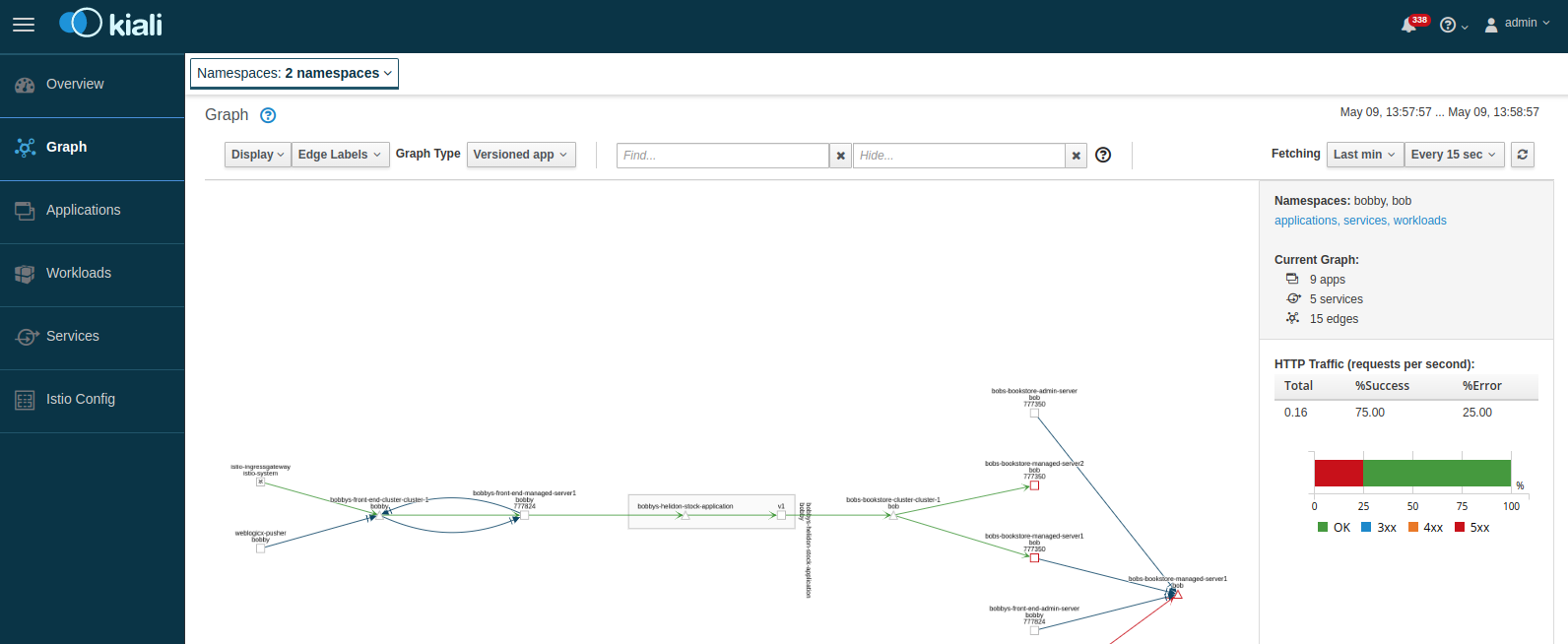
provides it. The following image shows an example with traffic
flowing: in from the Istio gateway on the left, to a domain called domain1.
In this example, you can see how the traffic flows to the cluster services and then to the individual Managed Servers.
To learn more, see Istio traffic management .
Distributed tracing
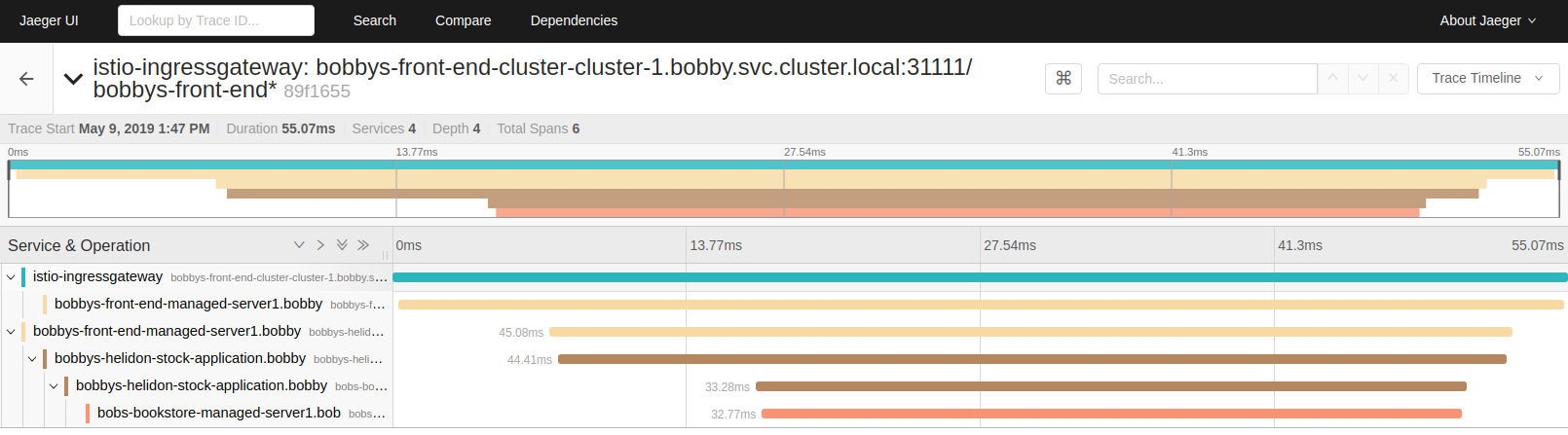
Istio provides distributed tracing capabilities, including the ability to view traces in Jaeger. To use distributed tracing though, first you will need to instrument your WebLogic application, for example, using the Jaeger Java client . The following image shows an example of a distributed trace that shows a transaction following the same path through the system as shown in the previous image.
To learn more, see distrubting tracing in Istio .
Automatically added network channels
The operator will automatically add network channels to each WebLogic Server when Istio is enabled for a domain.
Network channel for Istio versions v1.10 and later
Background:
Beginning with Istio version 1.10, Istio’s networking behavior was simplified. It changed so that the Istio network proxy that runs in each Istio sidecar (the Envoy proxy) no longer redirects network traffic to the current pod’s localhost interface, but instead directly forwards it to the network interface associated with the pod’s IP address. This means that the operator does not need to create additional localhost network channels on each WebLogic pod except to enable the readiness probe.
To learn more about changes to Istio networking beginning with Istio 1.10, see Upcoming networking changes in Istio 1.10 .
Channel behavior:
When deploying a domain that is configured to support Istio versions 1.10 and later, the operator automatically adds an HTTP protocol network channel (also known as Network Access Points) to your WebLogic configuration for each server so that the pod’s readiness probe is bound to the server pod’s network interface:
| Channel Name | Port | Listen address | Protocol | Exposed as a container port |
|---|---|---|---|---|
http-probe-ext |
From configuration Istio readinessPort |
Server Pod’s IP address | http |
No |
Network channel for WebLogic EJB and servlet session state replication traffic
WebLogic Kubernetes Operator versions 4.0 and later support WebLogic EJB and servlet session state replication traffic in an Istio service mesh; it uses the default channel of the domain for replication.
Security
Istio provides rich sets of security features that you can use to secure the Istio service mesh environments. For details, see Istio Security . The following are some sample scenarios.
Mutual TLS
By default, all traffic between the Istio sidecar proxies use mutual TLS within the mesh. However, service within the mesh can still be accessed by other pods outside the mesh. For example, you have domain-1 deployed with sidecar injection, therefore within the mesh, and another domain, domain-2, deployed without sidecar injection, therefore outside of the mesh. Services within domain-2 can still access the services within domain-1, however the traffic will be Plain unencrypted traffic. This is because by default, Istio configures the traffic using the PERMISSIVE mode, which means it can accept both Plain and mutual TLS traffic. You can restrict this behavior by allowing only mutual TLS traffic by locking down the entire mesh or by namespace within the mesh.
For locking down the entire mesh, you can:
For namespace only, you can:
See Istio Mutual TLS Migration .
Authorization policy
Istio provides policy-based authorization using AuthorizationPolicy. You can set up policies to deny or allow access to services deployed in the mesh. For example, if you want to limit access to a particular service in the domain from another namespace only with a service account.
Create a service account for the client namespace.
Set up the service account in the client deployment pod. For example, if it is another WebLogic Domain in the Operator, specify the ServiceAccountName in the domain.spec.serverPod.
Create an AuthorizationPolicy for the target service.
See Istio Authorization Policy .
Destination rule
Istio allows you to define traffic management polices applied to the service after the routing has occurred. You can use it to control load balancing, connection pool size from the sidecar, and outlier detection settings to detect and evict unhealthy hosts from the load balancing pool. You can also set up a service-level mutual TLS requirement instead of entire mesh or namespace-based.
For example, to configure service-level mutual TLS:
For example, to configure a sticky session for a service using hashing-based hash key user_cookie:
See Istio Destination Rule .
Ingress gateway
Ingress gateway provides similar functions to Kubernetes Ingress but with more advanced functionality.
I. For example, to configure an Ingress gateway for SSL termination at the gateway:
- Create a TLS certificate and secret.
- Create the Ingress gateway.
If you are accessing the WebLogic Console through a secure gateway with SSL termination at the gateway level, enable
WeblogicPluginEnabled in the WebLogic domain and add the appropriate request headers. For example,
If you are using WDT, add the resources section in the model YAML file.
If you are using WLST, set the WeblogicPluginEnabled for each server and cluster
Set the request headers in the virtual service: (Use kubectl explain virtualservice.spec.http.route.headers for help)
II. For example, to configure an Ingress gateway for SSL passthrough:
The virtual service will then configure to match the tls rule.
See Istio Ingress .