Cannot pull image
My domain will not start and I see errors like
ImagePullBackofforCannot pull image
When you see these kinds of errors, it means that Kubernetes cannot find your container image. The most common causes are:
- The
imagevalue in your Domain is set incorrectly, meaning Kubernetes will be trying to pull the wrong image. - The image requires authentication or permission to pull it and you have not
configured Kubernetes with the necessary credentials, for example in an
imagePullSecret. - You built the image on a machine that is not where your
kubeletis running and Kubernetes cannot see the image, meaning you need to copy the image to the worker nodes or put it in a container registry that is accessible the to all of the worker nodes.
Let’s review what happens when Kubernetes starts a pod.
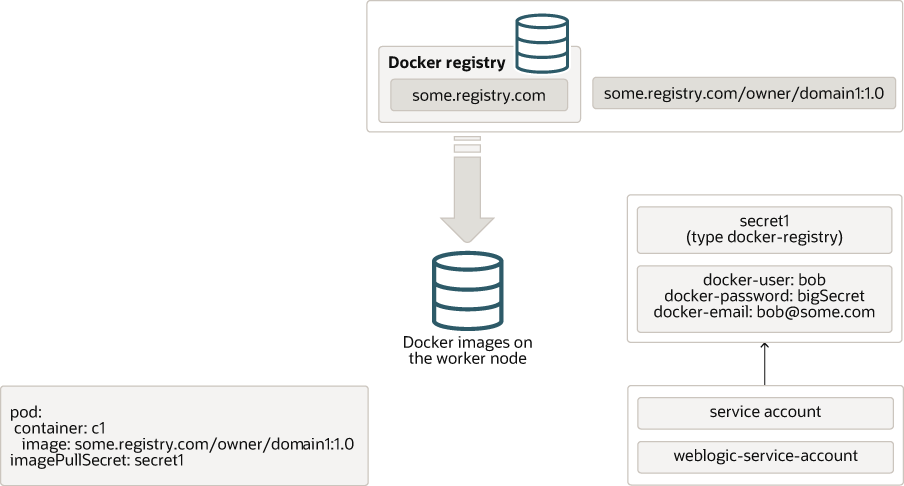
The definition of the pod contains a list of container specifications. Each container
specification contains the name (and optionally, tag) of the image that should be used
to run that container. In the previous example, there is a container called c1 which is
configured to use the container image some.registry.com/owner/domain1:1.0. This image
name is in the format registry address / owner / name : tag, so in this case the
registry is some.registry.com, the owner is owner, the image name is domain
and the tag is 1.0. Tags are a lot like version numbers, but they are not required
to be numbers or to be in any particular sequence or format. If you omit the tag, it
is assumed to be latest.
Note
The tag latest is confusing - it does not actually mean the latest version of
the image that was created or published in the registry; it just literally means
whichever version the owner decided to call “latest”. Docker and Kubernetes make
some assumptions about latest, and it is generally recommended to avoid using it and instead
specify the actual version or tag that you really want.
First, Kubernetes will check to see if the requested image is available in the local container image store on whichever worker node the pod was scheduled on. If it is there, then it will use that image to start the container. If it is not there, then Kubernetes will attempt to pull the image from a remote container registry.
Note
There is another setting called imagePullPolicy that can be used to force Kubernetes
to always pull the image, even if it is already present in the local container image
store.
If the image is available in the remote registry and it is public, that is it does not require authentication, then Kubernetes will pull the image to the local container image store and start the container.
Images that require authentication
If the remote container registry requires authentication, then you will need to provide
the authentication details in a Kubernetes docker-registry secret and tell Kubernetes
to use that secret when pulling the image.
To create a secret, you can use the following command:
where actual values should replace the strings in angle brackets. Note that the docker-server
is set to the registry name, without the https:// prefix; the docker-username, docker-password
and docker-email are set to match the credentials you use to authenticate to the remote
container registry; and the namespace must be set to the same namespace where you intend to
use the image.
Note
Some registries may need a suffix making the docker-server something like some.registry.com/v2
for example. You will need to check with your registry provider’s documentation to determine if this is needed.
After the secret is created, you need to tell Kubernetes to use it. This is done by adding
an imagePullSecret to your Kubernetes YAML file. In the case of a WebLogic domain, you
add the secret name to the imagePullSecret in the domain custom resource YAML file.
Here is an example of part of a domain custom resource file with the imagePullSecret
specified:
Alternatively, you can associate the secret with the service account that will be used to run
the pod. If you do this, then you will not need to add the imagePullSecret to the domain
resource. This is useful if you are running multiple domains in the same namespace.
To add the secret shown previously to the default service account in the weblogic namespace, you
would use a command like this:
Note
You can provide multiple imagePullSecrets if you need to pull container images from multiple
remote container registries or if your images require different authentication credentials.
For more information, see
Container Image Protection
.
Pushing the image to a repository
If you have an image in your local repository that you would like to copy to a remote repository, then the Docker steps are:
- Use docker login to log in to the target repository’s registry. For example:
- Use docker tag to mark the image with the target registry, owner, repository name, and tag. For example:
- Use docker push to push the image to the repository. For example:
Manually copying the image to your worker nodes
If you are not able to use a remote container registry, for example if your Kubernetes cluster is in a secure network with no external access, then you can manually copy the container images to the cluster instead.
On the machine where you created the image, export it into a TAR file using this command:
Then copy that TAR file to each worker node in your Kubernetes cluster and run this command on each node:
Restart pods to clear the error
After you have ensured that the images are accessible on all worker nodes, you may need to restart the pods so that Kubernetes will attempt to pull the images again. You can do this by deleting the pods themselves, or deleting the Domain and then recreating it.