
1. Vector Index
VectorIndex supports Retrieval Augmented Generation (RAG). It converts
source documents into vector embeddings, stores the embeddings in a vector
store, and links the vector index to a Select AI profile. When that profile is
used for natural language generation, Select AI can retrieve semantically
similar content from the vector index and use that content as grounding context
for the response.
A vector index is useful when the answer should come from files or documents that are not represented as relational tables. Typical sources include documents in Object Storage, product manuals, generated reports, logs, JSON files, and other text-heavy content that should be searched by meaning rather than exact keywords.
Before creating a vector index, make sure the database user has:
A Select AI profile with an AI provider that supports embeddings.
A credential for the AI provider used by the profile.
A credential for the object storage location if the source objects are not public.
Network access to the AI provider endpoint and the source location. See Privileges for network ACL helpers.
The usual lifecycle is:
Create a profile with a provider and embedding model.
Create
OracleVectorIndexAttributeswith the source location and storage credential.Create
VectorIndexand callcreate().Use the linked profile for RAG actions such as
narrate().Fetch, list, update, disable, enable, or delete the index as needed.
2. VectorIndex Object Model
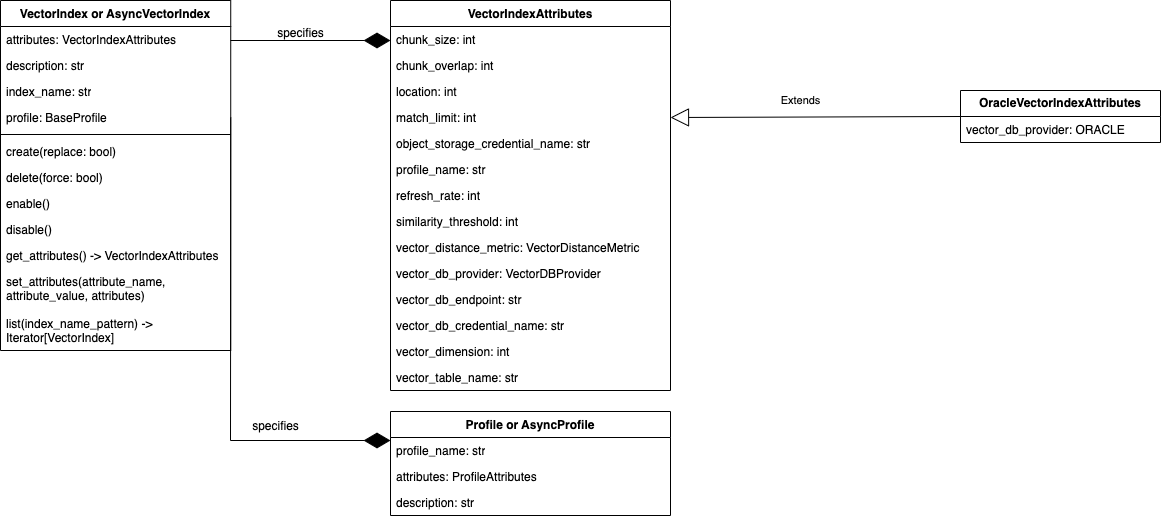
3. VectorIndexAttributes
A VectorIndexAttributes object can be created with
select_ai.VectorIndexAttributes(). Also check
vector index attributes
For Oracle vector indexes, use OracleVectorIndexAttributes. It sets
vector_db_provider to VectorDBProvider.ORACLE and is the preferred
attribute class for the examples in this guide.
Common attributes:
Attribute |
Use |
|---|---|
|
Object Storage URI or source location containing the documents to embed. |
|
Credential used to read the source location. |
|
Select AI profile used to create embeddings and answer RAG prompts.
If omitted during |
|
Control how source text is split before embedding. Larger chunks keep more context together; overlap helps preserve context across chunk boundaries. |
|
Maximum number of matching chunks returned during semantic search. |
|
Minimum similarity score required for retrieved chunks to be considered relevant. |
|
Distance metric used to compare embeddings. Supported values include
|
|
Refresh interval, in minutes, for loading new or changed source data. |
|
Name of the table used to store vector embeddings and chunked data. Leave unset unless you need to control the storage table name. |
|
Include filenames and source links in RAG output when supported by the profile and model response. |
Example attributes:
attributes = select_ai.OracleVectorIndexAttributes(
    location="https://objectstorage.us-ashburn-1.oraclecloud.com/n/example/b/docs/o/product-guides",
    object_storage_credential_name="object_store_credential",
    chunk_size=1024,
    chunk_overlap=128,
    match_limit=5,
    similarity_threshold=0.5,
    vector_distance_metric=select_ai.VectorDistanceMetric.COSINE,
    refresh_rate=1440,
)
The embedding model is configured on the provider inside the linked
ProfileAttributes. Keep the profile provider and vector index attributes
together conceptually: the profile decides how embeddings are generated, while
the vector index attributes decide where content is read from, how it is
chunked, and how the vector store is searched.
- class select_ai.VectorIndexAttributes(chunk_size: int | None = None, chunk_overlap: int | None = None, enable_sources: bool | None = None, location: str | None = None, match_limit: int | None = None, object_storage_credential_name: str | None = None, profile_name: str | None = None, refresh_rate: int | None = None, similarity_threshold: float | None = None, vector_distance_metric: VectorDistanceMetric | None = None, vector_db_endpoint: str | None = None, vector_db_credential_name: str | None = None, vector_db_provider: VectorDBProvider | None = None, vector_dimension: int | None = None, vector_table_name: str | None = None, pipeline_name: str | None = None)
Attributes of a vector index help to manage and configure the behavior of the vector index.
- Parameters:
chunk_size (int) – Text size of chunking the input data.
chunk_overlap (int) – Specifies the amount of overlapping characters between adjacent chunks of text.
enable_sources – Provides document source links and filenames in RAG output
location (str) – Location of the object store.
match_limit (int) – Specifies the maximum number of results to return in a vector search query
object_storage_credential_name (str) – Name of the credentials for accessing object storage.
profile_name (str) – Name of the AI profile which is used for embedding source data and user prompts.
refresh_rate (int) – Interval of updating data in the vector store. The unit is minutes.
similarity_threshold (float) – Defines the minimum level of similarity required for two items to be considered a match
vector_distance_metric (VectorDistanceMetric) – Specifies the type of distance calculation used to compare vectors in a database
vector_db_provider (VectorDBProvider) – Name of the Vector database provider. Default value is “oracle”
vector_db_endpoint (str) – Endpoint to access the Vector database
vector_db_credential_name (str) – Name of the credentials for accessing Vector database
vector_dimension (int) – Specifies the number of elements in each vector within the vector store
vector_table_name (str) – Specifies the name of the table or collection to store vector embeddings and chunked data
3.1. OracleVectorIndexAttributes
- class select_ai.OracleVectorIndexAttributes(chunk_size: int | None = None, chunk_overlap: int | None = None, enable_sources: bool | None = None, location: str | None = None, match_limit: int | None = None, object_storage_credential_name: str | None = None, profile_name: str | None = None, refresh_rate: int | None = None, similarity_threshold: float | None = None, vector_distance_metric: VectorDistanceMetric | None = None, vector_db_endpoint: str | None = None, vector_db_credential_name: str | None = None, vector_db_provider: VectorDBProvider | None = VectorDBProvider.ORACLE, vector_dimension: int | None = None, vector_table_name: str | None = None, pipeline_name: str | None = None)
Oracle specific vector index attributes
4. VectorIndex API
A VectorIndex object can be created with select_ai.VectorIndex()
- class select_ai.VectorIndex(profile: BaseProfile | None = None, index_name: str | None = None, description: str | None = None, attributes: VectorIndexAttributes | None = None)
VectorIndex objects let you manage vector indexes
- Parameters:
index_name (str) – The name of the vector index
description (str) – The description of the vector index
attributes (select_ai.VectorIndexAttributes) – The attributes of the vector index
- create(replace: bool | None = False, wait_for_completion: bool = False)
- Create a vector index in the database and populates the index
with data from an object store bucket using an async scheduler job
- Parameters:
replace (bool) – Replace vector index if it exists
wait_for_completion (bool) – True to wait for index creation
- Returns:
None
- delete(include_data: bool | None = True, force: bool | None = False)
This procedure removes a vector store index
- Parameters:
include_data (bool) – Indicates whether to delete both the customer’s vector store and vector index along with the vector index object
force (bool) – Indicates whether to ignore errors that occur if the vector index does not exist
- Returns:
None
- Raises:
oracledb.DatabaseError
- classmethod delete_index(index_name: str, include_data: bool = True, force: bool = False)
Class method to remove a vector store index
- Parameters:
index_name (str) – The name of the vector index
include_data (bool) – Indicates whether to delete both the customer’s vector store and vector index along with the vector index object
force (bool) – Indicates whether to ignore errors that occur if the vector index does not exist
- Returns:
None
- Raises:
oracledb.DatabaseError
- disable()
This procedure disables a vector index object in the current database. When disabled, an AI profile cannot use the vector index, and the system does not load data into the vector store as new data is added to the object store and does not perform indexing, searching or querying based on the index.
- Returns:
None
- Raises:
oracledb.DatabaseError
- enable()
This procedure enables or activates a previously disabled vector index object. Generally, when you create a vector index, by default it is enabled such that the AI profile can use it to perform indexing and searching.
- Returns:
None
- Raises:
oracledb.DatabaseError
- classmethod fetch(index_name: str) VectorIndex
Fetches vector index attributes from the database and builds a proxy object for the passed index_name
- Parameters:
index_name (str) – The name of the vector index
- get_attributes() VectorIndexAttributes
Get attributes of this vector index
- Returns:
select_ai.VectorIndexAttributes
- Raises:
VectorIndexNotFoundError
- get_next_refresh_timestamp() datetime | None
Returns the UTC timestamp of the next scheduled refresh
- get_profile() Profile
Get Profile object linked to this vector index
- Returns:
select_ai.Profile
- Raises:
ProfileNotFoundError
- classmethod list(index_name_pattern: str = '.*') Iterator[VectorIndex]
List Vector Indexes
- Parameters:
index_name_pattern (str) – Regular expressions can be used to specify a pattern. Function REGEXP_LIKE is used to perform the match. Default value is “.*” i.e. match all vector indexes.
- Returns:
Iterator[VectorIndex]
- set_attribute(attribute_name: str, attribute_value: str | int | float)
This procedure updates an existing vector store index with a specified value of the vector index attribute.
- Parameters:
attribute_name (str) – Custom attribute name
attribute_value (Union[str, int, float]) – Attribute Value
- set_attributes(attributes: VectorIndexAttributes = None)
This procedure updates an existing vector store index with a specified value of the vector index attributes. Specify multiple attributes by passing an object of type :class VectorIndexAttributes
- Parameters:
attributes (select_ai.VectorIndexAttributes) – Use this to update multiple attribute values
- Returns:
None
- Raises:
oracledb.DatabaseError
Use the synchronous API in scripts, notebooks, and command-line tools that use
select_ai.connect(). Use AsyncVectorIndex in applications already using
asyncio and select_ai.async_connect() or an async connection pool.
Important lifecycle methods:
Method |
Use |
|---|---|
|
Create the database vector index and start the load pipeline. If
|
|
Build a |
|
Iterate over vector indexes visible to the current user. The pattern is
evaluated with Oracle |
|
Update one or more index attributes. |
|
Return the next scheduled refresh timestamp in UTC when the index has a refresh rate and a recorded pipeline execution. |
|
Pause or resume use of the vector index for loading, indexing, searching, and querying. |
|
Drop the vector index. |
Check the examples below to understand how to create vector indexes.
4.1. Create vector index
In the following example, vector database provider is Oracle and
objects used to create embeddings reside in OCI Object Storage. The profile
uses an OCI Generative AI provider with an embedding model, and the vector
index is linked to that profile during create().
import os

import select_ai

user = os.getenv("SELECT_AI_USER")
password = os.getenv("SELECT_AI_PASSWORD")
dsn = os.getenv("SELECT_AI_DB_CONNECT_STRING")


select_ai.connect(user=user, password=password, dsn=dsn)
# Configure an AI provider with an embedding model
# of your choice
provider = select_ai.OCIGenAIProvider(
    region="us-chicago-1",
    oci_apiformat="GENERIC",
    embedding_model="cohere.embed-english-v3.0",
)

# Create an AI profile to use the Vector index with
profile_attributes = select_ai.ProfileAttributes(
    credential_name="my_oci_ai_profile_key",
    provider=provider,
)
profile = select_ai.Profile(
    profile_name="oci_vector_ai_profile",
    attributes=profile_attributes,
    description="MY OCI AI Profile",
    replace=True,
)

# Specify objects to create an embedding for. In this example,
# the objects reside in ObjectStore and the vector database is
# Oracle
vector_index_attributes = select_ai.OracleVectorIndexAttributes(
    location="https://objectstorage.us-ashburn-1.oraclecloud.com/n/dwcsdev/b/conda-environment/o/tenant1-pdb3/graph",
    object_storage_credential_name="my_oci_ai_profile_key",
)

# Create a Vector index object
vector_index = select_ai.VectorIndex(
    index_name="test_vector_index",
    attributes=vector_index_attributes,
    description="Test vector index",
    profile=profile,
)
vector_index.create(replace=True, wait_for_completion=True)
print("Created vector index: test_vector_index")
output:
Created vector index: test_vector_index
4.2. List vector index
import os

import select_ai

user = os.getenv("SELECT_AI_USER")
password = os.getenv("SELECT_AI_PASSWORD")
dsn = os.getenv("SELECT_AI_DB_CONNECT_STRING")

select_ai.connect(user=user, password=password, dsn=dsn)
vector_index = select_ai.VectorIndex()
for index in vector_index.list(index_name_pattern="^test"):
    print("Vector index", index.index_name)
    print("Vector index profile", index.profile)
output:
Vector index TEST_VECTOR_INDEX
Vector index profile Profile(profile_name=oci_vector_ai_profile, attributes=ProfileAttributes(annotations=None, case_sensitive_values=None, comments=None, constraints=None, conversation=None, credential_name='my_oci_ai_profile_key', enable_sources=None, enable_source_offsets=None, enforce_object_list=None, max_tokens=1024, object_list=None, object_list_mode=None, provider=OCIGenAIProvider(embedding_model=None, model=None, provider_name='oci', provider_endpoint=None, region='us-chicago-1', oci_apiformat='GENERIC', oci_compartment_id=None, oci_endpoint_id=None, oci_runtimetype=None), seed=None, stop_tokens=None, streaming=None, temperature=None, vector_index_name='test_vector_index'), description=None)
4.3. Fetch vector index
You can fetch the vector index attributes and associated AI profile using
the class method VectorIndex.fetch(index_name). Fetch is useful when the
index was created earlier or by another process and you want to inspect or
update it without recreating the original Python object.
import os

import select_ai

user = os.getenv("SELECT_AI_USER")
password = os.getenv("SELECT_AI_PASSWORD")
dsn = os.getenv("SELECT_AI_DB_CONNECT_STRING")

select_ai.connect(user=user, password=password, dsn=dsn)

vector_index = select_ai.VectorIndex.fetch(index_name="test_vector_index")
print(vector_index.attributes)
print(vector_index.profile)
print(vector_index.get_next_refresh_timestamp())
output:
OracleVectorIndexAttributes(chunk_size=1024, chunk_overlap=128, location='https://objectstorage.us-ashburn-1.oraclecloud.com/n/dwcsdev/b/conda-environment/o/tenant1-pdb3/graph', match_limit=5, object_storage_credential_name='my_oci_ai_profile_key', profile_name='oci_vector_ai_profile', refresh_rate=1450, similarity_threshold=0.5, vector_distance_metric='COSINE', vector_db_endpoint=None, vector_db_credential_name=None, vector_db_provider=<VectorDBProvider.ORACLE: 'oracle'>, vector_dimension=None, vector_table_name=None, pipeline_name='TEST_VECTOR_INDEX$VECPIPELINE')

Profile(profile_name=oci_vector_ai_profile, attributes=ProfileAttributes(annotations=None, case_sensitive_values=None, comments=None, constraints=None, conversation=None, credential_name='my_oci_ai_profile_key', enable_custom_source_uri=None, enable_sources=None, enable_source_offsets=None, enforce_object_list=None, max_tokens=1024, object_list=None, object_list_mode=None, provider=OCIGenAIProvider(embedding_model='cohere.embed-english-v3.0', model=None, provider_name='oci', provider_endpoint=None, region='us-chicago-1', oci_apiformat='GENERIC', oci_compartment_id=None, oci_endpoint_id=None, oci_runtimetype=None), seed=None, stop_tokens=None, streaming=None, temperature=None, vector_index_name='test_vector_index'), description=MY OCI AI Profile)
4.4. Update vector index attributes
To update attributes, use either vector_index.set_attribute() or
vector_index.set_attributes(). Use set_attribute() for a single value
and set_attributes() when updating several values together.
import os

import select_ai

user = os.getenv("SELECT_AI_USER")
password = os.getenv("SELECT_AI_PASSWORD")
dsn = os.getenv("SELECT_AI_DB_CONNECT_STRING")
select_ai.connect(user=user, password=password, dsn=dsn)
vector_index = select_ai.VectorIndex(
    index_name="test_vector_index",
)

# Use vector_index.set_attributes to update a multiple attributes
updated_attributes = select_ai.OracleVectorIndexAttributes(refresh_rate=1450)
vector_index.set_attributes(attributes=updated_attributes)

# Use vector_index.set_attribute to update a single attribute
vector_index.set_attribute(
    attribute_name="similarity_threshold", attribute_value=0.5
)
print(vector_index.attributes)
output:
OracleVectorIndexAttributes(chunk_size=1024, chunk_overlap=128, location='https://objectstorage.us-ashburn-1.oraclecloud.com/n/dwcsdev/b/conda-environment/o/tenant1-pdb3/graph', match_limit=5, object_storage_credential_name='my_oci_ai_profile_key', profile_name='oci_vector_ai_profile', refresh_rate=1450, similarity_threshold=0.5, vector_distance_metric='COSINE', vector_db_endpoint=None, vector_db_credential_name=None, vector_db_provider=<VectorDBProvider.ORACLE: 'oracle'>, vector_dimension=None, vector_table_name=None, pipeline_name='TEST_VECTOR_INDEX$VECPIPELINE')
4.5. RAG using vector index
After create() succeeds, the profile has its vector_index_name set to
the new index. Use that profile with text-returning actions such as
narrate() to retrieve relevant chunks from the vector index and ground the
answer in the indexed content.
import os

import select_ai

user = os.getenv("SELECT_AI_USER")
password = os.getenv("SELECT_AI_PASSWORD")
dsn = os.getenv("SELECT_AI_DB_CONNECT_STRING")

select_ai.connect(user=user, password=password, dsn=dsn)
profile = select_ai.Profile(profile_name="oci_vector_ai_profile")
r = profile.narrate("list the conda environments in my object store")
print(r)
output:
The conda environments in your object store are:
 1. fccenv
 2. myrenv
 3. fully-loaded-mlenv
 4. graphenv

 These environments are listed in the provided data as separate JSON documents, each containing information about a specific conda environment.

 Sources:
   - fccenv-manifest.json (https://objectstorage.us-ashburn-1.oraclecloud.com/n/dwcsdev/b/conda-environment/o/tenant1-pdb3/graph/fccenv-manifest.json)
   - myrenv-manifest.json (https://objectstorage.us-ashburn-1.oraclecloud.com/n/dwcsdev/b/conda-environment/o/tenant1-pdb3/graph/myrenv-manifest.json)
   - fully-loaded-mlenv-manifest.json (https://objectstorage.us-ashburn-1.oraclecloud.com/n/dwcsdev/b/conda-environment/o/tenant1-pdb3/graph/fully-loaded-mlenv-manifest.json)
   - graphenv-manifest.json (https://objectstorage.us-ashburn-1.oraclecloud.com/n/dwcsdev/b/conda-environment/o/tenant1-pdb3/graph/graphenv-manifest.json)
4.6. Delete vector index
Use delete() when the index is no longer needed. By default,
include_data=True removes the vector index metadata and the associated
vector store data. Set include_data=False only when you intentionally want
to keep the underlying vector store data.
import os

import select_ai

user = os.getenv("SELECT_AI_USER")
password = os.getenv("SELECT_AI_PASSWORD")
dsn = os.getenv("SELECT_AI_DB_CONNECT_STRING")

select_ai.connect(user=user, password=password, dsn=dsn)
vector_index = select_ai.VectorIndex(index_name="test_vector_index")
vector_index.delete(force=True)
print("Deleted vector index: test_vector_index")
output:
Deleted vector index: test_vector_index
5. AsyncVectorIndex API
An AsyncVectorIndex object can be created with
select_ai.AsyncVectorIndex()
- class select_ai.AsyncVectorIndex(profile: BaseProfile | None = None, index_name: str | None = None, description: str | None = None, attributes: VectorIndexAttributes | None = None)
AsyncVectorIndex objects let you manage vector indexes using async APIs. Use this for non-blocking concurrent requests
- Parameters:
index_name (str) – The name of the vector index
description (str) – The description of the vector index
attributes (VectorIndexAttributes) – The attributes of the vector index
- async create(replace: bool | None = False, wait_for_completion: bool | None = False) None
Create a vector index in the database and populates it with data from an object store bucket using an async scheduler job
- Parameters:
replace (bool) – True to replace existing vector index
wait_for_completion (bool) – True to wait for index creation
- async delete(include_data: bool | None = True, force: bool | None = False) None
This procedure removes a vector store index.
- Parameters:
include_data (bool) – Indicates whether to delete both the customer’s vector store and vector index along with the vector index object.
force (bool) – Indicates whether to ignore errors that occur if the vector index does not exist.
- Returns:
None
- Raises:
oracledb.DatabaseError
- async classmethod delete_index(index_name: str, include_data: bool = True, force: bool = False)
Class method to remove a vector store index
- Parameters:
index_name (str) – The name of the vector index
include_data (bool) – Indicates whether to delete both the customer’s vector store and vector index along with the vector index object
force (bool) – Indicates whether to ignore errors that occur if the vector index does not exist
- Returns:
None
- Raises:
oracledb.DatabaseError
- async disable() None
This procedure disables a vector index object in the current database. When disabled, an AI profile cannot use the vector index, and the system does not load data into the vector store as new data is added to the object store and does not perform indexing, searching or querying based on the index.
- Returns:
None
- Raises:
oracledb.DatabaseError
- async enable() None
This procedure enables or activates a previously disabled vector index object. Generally, when you create a vector index, by default it is enabled such that the AI profile can use it to perform indexing and searching.
- Returns:
None
- Raises:
oracledb.DatabaseError
- async classmethod fetch(index_name: str) AsyncVectorIndex
Fetches vector index attributes from the database and builds a proxy object for the passed index_name
- Parameters:
index_name (str) – The name of the vector index
- async get_attributes() VectorIndexAttributes
Get attributes of a vector index
- Returns:
select_ai.VectorIndexAttributes
- Raises:
VectorIndexNotFoundError
- async get_next_refresh_timestamp() datetime | None
Return the UTC timestamp for the next scheduled refresh.
- async get_profile() AsyncProfile
Get AsyncProfile object linked to this vector index
- Returns:
select_ai.AsyncProfile
- Raises:
ProfileNotFoundError
- classmethod list(index_name_pattern: str = '.*') AsyncGenerator[AsyncVectorIndex, None]
List Vector Indexes.
- Parameters:
index_name_pattern (str) – Regular expressions can be used to specify a pattern. Function REGEXP_LIKE is used to perform the match. Default value is “.*” i.e. match all vector indexes.
- Returns:
AsyncGenerator[VectorIndex]
- async set_attribute(attribute_name: str, attribute_value: str | int | float) None
This procedure updates an existing vector store index with a specified value of the vector index attribute.
- Parameters:
attribute_name (str) – Custom attribute name
attribute_value (Union[str, int, float]) – Attribute Value
- async set_attributes(attributes: VectorIndexAttributes) None
This procedure updates an existing vector store index with a specified value of the vector index attribute. multiple attributes by passing an object of type :class VectorIndexAttributes
- Parameters:
attributes (select_ai.VectorIndexAttributes) – Use this to update multiple attribute values
- Returns:
None
- Raises:
oracledb.DatabaseError
The async API mirrors the synchronous API. Async profile construction and
vector index methods that access the database must be awaited, and
AsyncVectorIndex.list() is an async iterator.
Synchronous API |
Async API |
|---|---|
|
|
|
|
|
|
|
|
|
|
|
|
5.1. Async create vector index
import asyncio
import os

import select_ai

user = os.getenv("SELECT_AI_USER")
password = os.getenv("SELECT_AI_PASSWORD")
dsn = os.getenv("SELECT_AI_DB_CONNECT_STRING")


async def main():
    await select_ai.async_connect(user=user, password=password, dsn=dsn)

    provider = select_ai.OCIGenAIProvider(
        region="us-chicago-1",
        oci_apiformat="GENERIC",
        embedding_model="cohere.embed-english-v3.0",
    )
    profile_attributes = select_ai.ProfileAttributes(
        credential_name="my_oci_ai_profile_key",
        provider=provider,
    )
    async_profile = await select_ai.AsyncProfile(
        profile_name="async_oci_vector_ai_profile",
        attributes=profile_attributes,
        description="MY OCI AI Profile",
        replace=True,
    )

    vector_index_attributes = select_ai.OracleVectorIndexAttributes(
        location="https://objectstorage.us-ashburn-1.oraclecloud.com/n/dwcsdev/b/conda-environment/o/tenant1-pdb3/graph",
        object_storage_credential_name="my_oci_ai_profile_key",
    )

    async_vector_index = select_ai.AsyncVectorIndex(
        index_name="test_vector_index",
        attributes=vector_index_attributes,
        description="Vector index for conda environments",
        profile=async_profile,
    )
    await async_vector_index.create(replace=True, wait_for_completion=True)
    print("Created vector index: test_vector_index")


asyncio.run(main())
output:
created vector index: test_vector_index
5.2. Async list vector index
import asyncio
import os

import select_ai

user = os.getenv("SELECT_AI_USER")
password = os.getenv("SELECT_AI_PASSWORD")
dsn = os.getenv("SELECT_AI_DB_CONNECT_STRING")


async def main():
    await select_ai.async_connect(user=user, password=password, dsn=dsn)
    vector_index = select_ai.AsyncVectorIndex()
    async for index in vector_index.list(index_name_pattern="^test"):
        print("Vector index", index.index_name)
        print("Vector index profile", index.profile)


asyncio.run(main())
output:
Vector index TEST_VECTOR_INDEX
Vector index profile AsyncProfile(profile_name=oci_vector_ai_profile, attributes=ProfileAttributes(annotations=None, case_sensitive_values=None, comments=None, constraints=None, conversation=None, credential_name='my_oci_ai_profile_key', enable_sources=None, enable_source_offsets=None, enforce_object_list=None, max_tokens=1024, object_list=None, object_list_mode=None, provider=OCIGenAIProvider(embedding_model=None, model=None, provider_name='oci', provider_endpoint=None, region='us-chicago-1', oci_apiformat='GENERIC', oci_compartment_id=None, oci_endpoint_id=None, oci_runtimetype=None), seed=None, stop_tokens=None, streaming=None, temperature=None, vector_index_name='test_vector_index'), description=None)
5.3. Async fetch vector index
You can fetch the vector index attributes and associated AI profile using
the class method AsyncVectorIndex.fetch(index_name)
import asyncio
import os

import select_ai

user = os.getenv("SELECT_AI_USER")
password = os.getenv("SELECT_AI_PASSWORD")
dsn = os.getenv("SELECT_AI_DB_CONNECT_STRING")


async def main():
    await select_ai.async_connect(user=user, password=password, dsn=dsn)
    async_vector_index = await select_ai.AsyncVectorIndex.fetch(
        index_name="test_vector_index"
    )
    print(async_vector_index.attributes)
    print(async_vector_index.profile)
    print(await async_vector_index.get_next_refresh_timestamp())


asyncio.run(main())
output:
OracleVectorIndexAttributes(chunk_size=1024, chunk_overlap=128, location='https://objectstorage.us-ashburn-1.oraclecloud.com/n/dwcsdev/b/conda-environment/o/tenant1-pdb3/graph', match_limit=5, object_storage_credential_name='my_oci_ai_profile_key', profile_name='oci_vector_ai_profile', refresh_rate=1450, similarity_threshold=0.5, vector_distance_metric='COSINE', vector_db_endpoint=None, vector_db_credential_name=None, vector_db_provider=<VectorDBProvider.ORACLE: 'oracle'>, vector_dimension=None, vector_table_name=None, pipeline_name='TEST_VECTOR_INDEX$VECPIPELINE')

AsyncProfile(profile_name=oci_vector_ai_profile, attributes=ProfileAttributes(annotations=None, case_sensitive_values=None, comments=None, constraints=None, conversation=None, credential_name='my_oci_ai_profile_key', enable_custom_source_uri=None, enable_sources=None, enable_source_offsets=None, enforce_object_list=None, max_tokens=1024, object_list=None, object_list_mode=None, provider=OCIGenAIProvider(embedding_model='cohere.embed-english-v3.0', model=None, provider_name='oci', provider_endpoint=None, region='us-chicago-1', oci_apiformat='GENERIC', oci_compartment_id=None, oci_endpoint_id=None, oci_runtimetype=None), seed=None, stop_tokens=None, streaming=None, temperature=None, vector_index_name='test_vector_index'), description=MY OCI AI Profile)
5.4. Async update vector index attributes
To update attributes, use either async_vector_index.set_attribute() or
async_vector_index.set_attributes()
import asyncio
import os

import select_ai

user = os.getenv("SELECT_AI_USER")
password = os.getenv("SELECT_AI_PASSWORD")
dsn = os.getenv("SELECT_AI_DB_CONNECT_STRING")


async def main():
    await select_ai.async_connect(user=user, password=password, dsn=dsn)
    async_vector_index = select_ai.AsyncVectorIndex(
        index_name="test_vector_index",
    )

    # Use vector_index.set_attributes to update a multiple attributes
    updated_attributes = select_ai.OracleVectorIndexAttributes(
        refresh_rate=1450
    )
    await async_vector_index.set_attributes(attributes=updated_attributes)

    # Use vector_index.set_attribute to update a single attribute
    await async_vector_index.set_attribute(
        attribute_name="similarity_threshold", attribute_value=0.5
    )
    print(async_vector_index.attributes)


asyncio.run(main())
output:
OracleVectorIndexAttributes(chunk_size=1024, chunk_overlap=128, location='https://objectstorage.us-ashburn-1.oraclecloud.com/n/dwcsdev/b/conda-environment/o/tenant1-pdb3/graph', match_limit=5, object_storage_credential_name='my_oci_ai_profile_key', profile_name='oci_vector_ai_profile', refresh_rate=1450, similarity_threshold=0.5, vector_distance_metric='COSINE', vector_db_endpoint=None, vector_db_credential_name=None, vector_db_provider=<VectorDBProvider.ORACLE: 'oracle'>, vector_dimension=None, vector_table_name=None, pipeline_name='TEST_VECTOR_INDEX$VECPIPELINE')
5.5. Async RAG using vector index
import os

import select_ai

user = os.getenv("SELECT_AI_USER")
password = os.getenv("SELECT_AI_PASSWORD")
dsn = os.getenv("SELECT_AI_DB_CONNECT_STRING")


async def main():
    await select_ai.async_connect(user=user, password=password, dsn=dsn)
    async_profile = await select_ai.AsyncProfile(
        profile_name="async_oci_vector_ai_profile"
    )
    r = await async_profile.narrate(
        "list the conda environments in my object store"
    )
    print(r)


asyncio.run(main())
output:
The conda environments in your object store are:
1. fccenv
2. myrenv
3. fully-loaded-mlenv
4. graphenv

These environments are listed in the provided data as separate JSON documents, each containing information about a specific conda environment.

Sources:
  - fccenv-manifest.json (https://objectstorage.us-ashburn-1.oraclecloud.com/n/dwcsdev/b/conda-environment/o/tenant1-pdb3/graph/fccenv-manifest.json)
  - myrenv-manifest.json (https://objectstorage.us-ashburn-1.oraclecloud.com/n/dwcsdev/b/conda-environment/o/tenant1-pdb3/graph/myrenv-manifest.json)
  - fully-loaded-mlenv-manifest.json (https://objectstorage.us-ashburn-1.oraclecloud.com/n/dwcsdev/b/conda-environment/o/tenant1-pdb3/graph/fully-loaded-mlenv-manifest.json)
  - graphenv-manifest.json (https://objectstorage.us-ashburn-1.oraclecloud.com/n/dwcsdev/b/conda-environment/o/tenant1-pdb3/graph/graphenv-manifest.json)