
An AI profile is a specification that includes the AI provider to use and other details regarding metadata and database objects required for generating responses to natural language prompts.
An AI profile object can be created using select_ai.Profile(). Creating a
profile stores the profile in Oracle Database. Later, you can instantiate
select_ai.Profile(profile_name="...") to reuse an existing database profile
without passing all attributes again.
Before creating a profile, make sure the database user has the required privileges, a credential for the AI provider, network access to the provider endpoint, and access to the database objects included in the profile. See Privileges, Credential, Provider, and ProfileAttributes.
1. Profile lifecycle
The usual profile lifecycle is:
Create a provider object.
Create
ProfileAttributeswith the provider, credential name, and object list.Create the profile with
select_ai.Profile(...).Reuse the profile later by name.
Update profile attributes when provider settings or object scope changes.
Delete profiles that are no longer needed.
replace=True recreates a profile when a profile with the same name already
exists. merge=True fetches the existing profile and updates it with the
non-null attributes passed by the caller.
2. Profile actions
Method |
Description |
|---|---|
|
Generates SQL for a natural language prompt without executing it. |
|
Generates SQL, executes it, and returns a |
|
Generates SQL, executes it, and returns a natural language answer. |
|
Explains the generated SQL for a prompt. |
|
Shows the prompt sent to the model. |
|
Sends a general chat prompt to the model. |
|
Summarizes inline content or content referenced by a URI. |
|
Translates text from one language to another. |
2.1. Profile Object Model
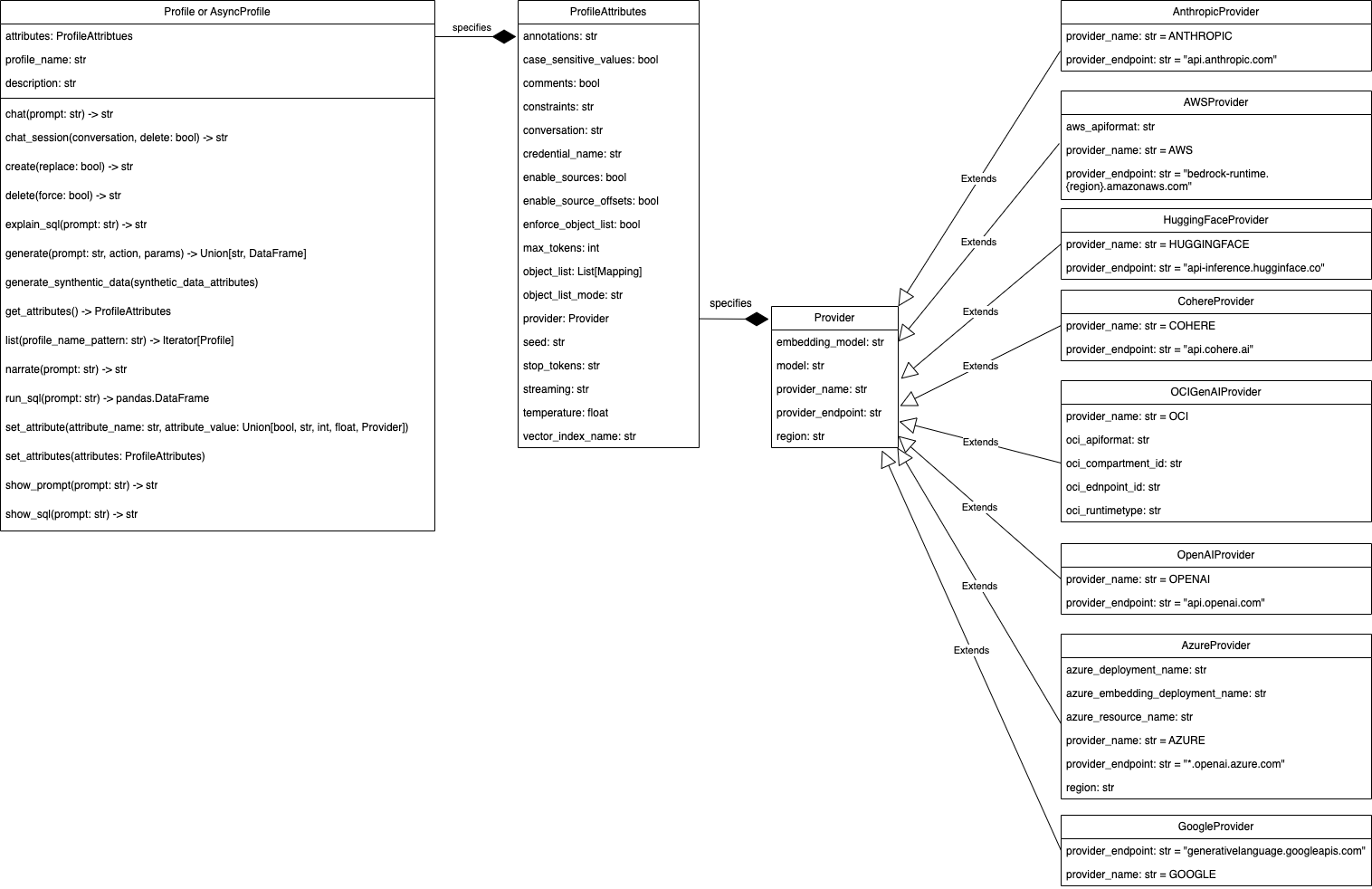
2.2. Base Profile API
- class select_ai.BaseProfile(profile_name: str | None = None, attributes: ProfileAttributes | None = None, description: str | None = None, merge: bool | None = False, replace: bool | None = False, raise_error_if_exists: bool | None = True, raise_error_on_empty_attributes: bool | None = False)
BaseProfile is an abstract base class representing a Profile for Select AI’s interactions with AI service providers (LLMs). Use either select_ai.Profile or select_ai.AsyncProfile to instantiate an AI profile object.
:param str profile_name : Name of the profile
- Parameters:
attributes (select_ai.ProfileAttributes) – Object specifying AI profile attributes
description (str) – Description of the profile
merge (bool) – Fetches the profile from database, merges the non-null attributes and saves it back in the database. Default value is False
replace (bool) – Replaces the profile and attributes in the database. Default value is False
raise_error_if_exists (bool) – Raise ProfileExistsError if profile exists in the database and replace = False and merge = False. Default value is True
raise_error_on_empty_attributes (bool) – Raise ProfileEmptyAttributesError, if profile attributes are empty in database. Default value is False.
2.3. Profile API
- class select_ai.Profile(*args, **kwargs)
Profile class represents an AI Profile. It defines attributes and methods to interact with the underlying AI Provider. All methods in this class are synchronous or blocking
- add_negative_feedback(prompt_spec: Tuple[str, Action] | None = None, sql_id: str | None = None, response: str | None = None, feedback_content: str | None = None)
Give negative feedback to the LLM
- Parameters:
prompt_spec (Tuple[str, Action]) – First element is the prompt and second is the corresponding action
sql_id (str) – SQL identifier from V$MAPPED_SQL view
response (str) – Expected SQL from LLM
feedback_content (str) – Actual feedback in natural language
- add_positive_feedback(prompt_spec: Tuple[str, Action] | None = None, sql_id: str | None = None)
Give positive feedback to the LLM
- Parameters:
prompt_spec (Tuple[str, Action]) – First element is the prompt and second is the corresponding action
sql_id (str) – SQL identifier from V$MAPPED_SQL view
- chat(prompt: str, params: Mapping = None, stream: bool = False, chunk_size: int = 8192) str | Generator[str, None, None]
Chat with the LLM
- Parameters:
prompt (str) – Natural language prompt
params – Parameters to include in the LLM request
stream (bool) – Return an iterator of response chunks
chunk_size (int) – Number of characters to read per stream chunk
- Returns:
str
- chat_session(conversation: Conversation, delete: bool = False)
Starts a new chat session for context-aware conversations
- Parameters:
conversation (Conversation) – Conversation object to use for this chat session
delete (bool) – Delete conversation after session ends
- Returns:
- create(replace: int | None = False) None
Create an AI Profile in the Database
- Parameters:
replace (bool) – Set True to replace else False
- Returns:
None
- Raises:
oracledb.DatabaseError
- delete(force=False) None
Deletes an AI profile from the database
- Parameters:
force (bool) – Ignores errors if AI profile does not exist.
- Returns:
None
- Raises:
oracledb.DatabaseError
- delete_feedback(prompt_spec: Tuple[str, Action] = None, sql_id: str | None = None)
Delete feedback from the database
- Parameters:
prompt_spec (Tuple[str, Action]) – First element is the prompt and second is the corresponding action
sql_id (str) – SQL identifier from V$MAPPED_SQL view
- classmethod delete_profile(profile_name: str, force: bool = False)
Class method to delete an AI profile from the database
- Parameters:
profile_name (str) – Name of the AI profile
force (bool) – Ignores errors if AI profile does not exist.
- Returns:
None
- Raises:
oracledb.DatabaseError
- explain_sql(prompt: str, params: Mapping = None, stream: bool = False, chunk_size: int = 8192) str | Generator[str, None, None]
Explain the generated SQL
- Parameters:
prompt (str) – Natural language prompt
params – Parameters to include in the LLM request
stream (bool) – Return an iterator of response chunks
chunk_size (int) – Number of characters to read per stream chunk
- Returns:
str
- classmethod fetch(profile_name: str) Profile
Create a proxy Profile object from fetched attributes saved in the database
- Parameters:
profile_name (str) – The name of the AI profile
- Returns:
select_ai.Profile
- Raises:
ProfileNotFoundError
- generate(prompt: str, action: Action | None = Action.RUNSQL, params: Mapping = None, stream: bool = False, chunk_size: int = 8192) DataFrame | str | Generator[str, None, None] | None
Perform AI translation using this profile
- Parameters:
prompt (str) – Natural language prompt to translate
action (select_ai.profile.Action)
params – Parameters to include in the LLM request. For e.g. conversation_id for context-aware chats
stream (bool) – Return an iterator of response chunks
chunk_size (int) – Number of characters to read per stream chunk
- Returns:
Union[pandas.DataFrame, str]
- generate_synthetic_data(synthetic_data_attributes: SyntheticDataAttributes) None
Generate synthetic data for a single table, multiple tables or a full schema.
- Parameters:
synthetic_data_attributes (select_ai.SyntheticDataAttributes)
- Returns:
None
- Raises:
oracledb.DatabaseError
- get_attributes() ProfileAttributes
Get AI profile attributes from the Database
- Returns:
select_ai.ProfileAttributes
- classmethod list(profile_name_pattern: str = '.*') Generator[Profile, None, None]
List AI Profiles saved in the database.
- Parameters:
profile_name_pattern (str) – Regular expressions can be used to specify a pattern. Function REGEXP_LIKE is used to perform the match. Default value is “.*” i.e. match all AI profiles.
- Returns:
Iterator[Profile]
- narrate(prompt: str, params: Mapping = None, stream: bool = False, chunk_size: int = 8192) str | Generator[str, None, None]
Narrate the result of the SQL
- Parameters:
prompt (str) – Natural language prompt
params – Parameters to include in the LLM request
stream (bool) – Return an iterator of response chunks
chunk_size (int) – Number of characters to read per stream chunk
- Returns:
str
- run_sql(prompt: str, params: Mapping = None) DataFrame
Run the generate SQL statement and return a pandas Dataframe built using the result set
- Parameters:
prompt (str) – Natural language prompt
params – Parameters to include in the LLM request
- Returns:
pandas.DataFrame
- set_attribute(attribute_name: str, attribute_value: bool | str | int | float | Provider)
Updates AI profile attribute on the Python object and also saves it in the database
- Parameters:
attribute_name (str) – Name of the AI profile attribute
attribute_value (Union[bool, str, int, float, Provider]) – Value of the profile attribute
- Returns:
None
- set_attributes(attributes: ProfileAttributes)
Updates AI profile attributes on the Python object and also saves it in the database
- Parameters:
attributes (ProviderAttributes) – Object specifying AI profile attributes
- Returns:
None
- show_prompt(prompt: str, params: Mapping = None, stream: bool = False, chunk_size: int = 8192) str | Generator[str, None, None]
Show the prompt sent to LLM
- Parameters:
prompt (str) – Natural language prompt
params – Parameters to include in the LLM request
stream (bool) – Return an iterator of response chunks
chunk_size (int) – Number of characters to read per stream chunk
- Returns:
str
- show_sql(prompt: str, params: Mapping = None, stream: bool = False, chunk_size: int = 8192) str | Generator[str, None, None]
Show the generated SQL
- Parameters:
prompt (str) – Natural language prompt
params – Parameters to include in the LLM request
stream (bool) – Return an iterator of response chunks
chunk_size (int) – Number of characters to read per stream chunk
- Returns:
str
- summarize(content: str = None, prompt: str = None, location_uri: str = None, credential_name: str = None, params: SummaryParams = None) str
Generate summary
- Parameters:
prompt (str) – Natural language prompt to guide the summary generation
content (str) – Specifies the text you want to summarize
location_uri (str) – Provides the URI where the text is stored or the path to a local file stored
credential_name (str) – Identifies the credential object used to authenticate with the object store
params (select_ai.summary.SummaryParams) – Parameters to include in the LLM request
- translate(text: str, source_language: str, target_language: str) str | None
Translate a text using a source language and a target language
- Parameters:
text (str) – Text to translate
source_language (str) – Source language
target_language (str) – Target language
- Returns:
str
2.4. Create Profile
The following example creates an OCI Gen AI profile that can generate SQL over
objects in the SH schema.
import os
from pprint import pformat

import select_ai

user = os.getenv("SELECT_AI_USER")
password = os.getenv("SELECT_AI_PASSWORD")
dsn = os.getenv("SELECT_AI_DB_CONNECT_STRING")

select_ai.connect(user=user, password=password, dsn=dsn)
provider = select_ai.OCIGenAIProvider(
    region="us-chicago-1", oci_apiformat="GENERIC"
)
profile_attributes = select_ai.ProfileAttributes(
    credential_name="my_oci_ai_profile_key",
    object_list=[{"owner": "SH"}],
    provider=provider,
)
profile = select_ai.Profile(
    profile_name="oci_ai_profile",
    attributes=profile_attributes,
    description="MY OCI AI Profile",
    replace=True,
)
print("Created profile ", profile.profile_name)
profile_attributes = profile.get_attributes()
print(
    "Profile attributes are: ",
    pformat(profile_attributes.dict(exclude_null=False)),
)
output:
Created profile  oci_ai_profile
Profile attributes are:  {'annotations': None,
 'case_sensitive_values': None,
 'comments': None,
 'constraints': None,
 'conversation': None,
 'credential_name': 'my_oci_ai_profile_key',
 'enable_source_offsets': None,
 'enable_sources': None,
 'enforce_object_list': None,
 'max_tokens': '1024',
 'object_list': '[{"owner":"SH"}]',
 'object_list_mode': None,
 'provider': OCIGenAIProvider(embedding_model=None,
                              model=None,
                              provider_name='oci',
                              provider_endpoint=None,
                              region='us-chicago-1',
                              oci_apiformat='GENERIC',
                              oci_compartment_id=None,
                              oci_endpoint_id=None,
                              oci_runtimetype=None),
 'seed': None,
 'stop_tokens': None,
 'streaming': None,
 'temperature': None,
 'vector_index_name': None}
2.5. Reuse Profile
After a profile has been created, instantiate Profile with only the profile
name to reuse the database profile:
profile = select_ai.Profile(profile_name="oci_ai_profile")
sql = profile.show_sql(prompt="How many promotions?")
Use Profile.fetch(...) when you want to create a proxy object from a saved
database profile and raise an error if the profile does not exist:
profile = select_ai.Profile.fetch("oci_ai_profile")
2.6. Update Profile
Use set_attribute(...) to update one profile attribute or
set_attributes(...) to update several attributes. Updates are saved to the
database profile.
profile = select_ai.Profile(profile_name="oci_ai_profile")
profile.set_attribute("temperature", 0.1)

profile.set_attributes(
    select_ai.ProfileAttributes(
        max_tokens=2048,
        enforce_object_list=True,
    )
)
2.7. Delete Profile
Use delete(...) or Profile.delete_profile(...) to remove a profile from
the database. Pass force=True when cleanup should succeed even if the
profile does not exist.
profile = select_ai.Profile(profile_name="oci_ai_profile")
profile.delete(force=True)

select_ai.Profile.delete_profile("oci_ai_profile", force=True)
2.8. Narrate
import os

import select_ai

user = os.getenv("SELECT_AI_USER")
password = os.getenv("SELECT_AI_PASSWORD")
dsn = os.getenv("SELECT_AI_DB_CONNECT_STRING")

select_ai.connect(user=user, password=password, dsn=dsn)
profile = select_ai.Profile(
    profile_name="oci_ai_profile",
)
narration = profile.narrate(prompt="How many promotions?")
print(narration)
output:
There are 503 promotions in the database.
2.9. Show SQL
import os

import select_ai

user = os.getenv("SELECT_AI_USER")
password = os.getenv("SELECT_AI_PASSWORD")
dsn = os.getenv("SELECT_AI_DB_CONNECT_STRING")

select_ai.connect(user=user, password=password, dsn=dsn)
profile = select_ai.Profile(profile_name="oci_ai_profile")
sql = profile.show_sql(prompt="How many promotions ?")
print(sql)
output:
SELECT
COUNT("p"."PROMO_ID") AS "Number of Promotions"
FROM "SH"."PROMOTIONS" "p"
2.10. Explain SQL
Use explain_sql(...) to generate SQL and return a natural language
explanation without executing the SQL.
profile = select_ai.Profile(profile_name="oci_ai_profile")
explanation = profile.explain_sql(prompt="How many promotions?")
print(explanation)
2.11. Show Prompt
Use show_prompt(...) to inspect the prompt that Select AI sends to the
model. This is useful when tuning profile attributes, object lists, comments,
constraints, and provider settings.
profile = select_ai.Profile(profile_name="oci_ai_profile")
prompt = profile.show_prompt(prompt="How many promotions?")
print(prompt)
2.12. Run SQL
import os

import select_ai

user = os.getenv("SELECT_AI_USER")
password = os.getenv("SELECT_AI_PASSWORD")
dsn = os.getenv("SELECT_AI_DB_CONNECT_STRING")

select_ai.connect(user=user, password=password, dsn=dsn)
profile = select_ai.Profile(profile_name="oci_ai_profile")
df = profile.run_sql(prompt="How many promotions ?")
print(df.columns)
print(df)
output:
Index(['Number of Promotions'], dtype='object')
    Number of Promotions
0                    503
2.13. Chat
import os

import select_ai

user = os.getenv("SELECT_AI_USER")
password = os.getenv("SELECT_AI_PASSWORD")
dsn = os.getenv("SELECT_AI_DB_CONNECT_STRING")

select_ai.connect(user=user, password=password, dsn=dsn)
profile = select_ai.Profile(profile_name="oci_ai_profile")
response = profile.chat(prompt="What is OCI ?")
print(response)
output:
OCI stands for Oracle Cloud Infrastructure. It is a comprehensive cloud computing platform provided by Oracle Corporation that offers a wide range of services for computing, storage, networking, database, and more.
...
...
OCI competes with other major cloud providers, including Amazon Web Services (AWS), Microsoft Azure, Google Cloud Platform (GCP), and IBM Cloud.
2.14. Streaming chat
import os

import select_ai

user = os.getenv("SELECT_AI_USER")
password = os.getenv("SELECT_AI_PASSWORD")
dsn = os.getenv("SELECT_AI_DB_CONNECT_STRING")

select_ai.connect(user=user, password=password, dsn=dsn)
profile = select_ai.Profile(profile_name="oci_ai_profile")

for chunk in profile.chat(
    prompt="What is OCI ?", stream=True, chunk_size=4096
):
    print(chunk, end="")
print()
stream=True lets callers consume generated CLOB responses chunk by chunk,
reducing memory pressure and making it easier to progressively forward output
to files, services, or user interfaces. Streaming text APIs return an iterator
of str chunks. The chunk_size parameter controls the number of CLOB
characters read per chunk; it is not a byte count.
Streaming is supported by generate(), chat(), narrate(),
explain_sql(), show_sql(), and show_prompt(). It is not supported
for run_sql(), which returns a pandas.DataFrame.
2.15. Summarize
Summarize inline content
import os

import select_ai

user = os.getenv("SELECT_AI_USER")
password = os.getenv("SELECT_AI_PASSWORD")
dsn = os.getenv("SELECT_AI_DB_CONNECT_STRING")

content = """
A gas cloud in our galaxy, Sagittarius B2, contains enough alcohol to brew 400
trillion pints of beer, and some stars are so cool that you could touch them
without being burned. Meanwhile, on the exoplanet 55 Cancri e, a form of
"hot ice" exists where high pressure prevents water from becoming gas even at
high temperatures. Additionally, some ancient stars found in the Milky Way's
halo are much older than the Sun, providing clues about the early universe and
its composition
"""

select_ai.connect(user=user, password=password, dsn=dsn)
profile = select_ai.Profile(profile_name="oci_ai_profile")
summary = profile.summarize(content=content)
print(summary)
output:
A gas cloud in the Sagittarius B2 galaxy contains a large amount of alcohol,
while some stars are cool enough to touch without being burned. The exoplanet
55 Cancri e has a unique form of "hot ice" where water remains solid despite
high temperatures due to high pressure. Ancient stars in the Milky Way's halo
are older than the Sun, providing insights into the early universe and its composition,
offering clues about the universe's formation and evolution.
Summarize content accessible via a URL
import os

import select_ai

user = os.getenv("SELECT_AI_USER")
password = os.getenv("SELECT_AI_PASSWORD")
dsn = os.getenv("SELECT_AI_DB_CONNECT_STRING")

select_ai.connect(user=user, password=password, dsn=dsn)
profile = select_ai.Profile(profile_name="oci_ai_profile")
summary = profile.summarize(
    location_uri="https://en.wikipedia.org/wiki/Astronomy"
)
print(summary)
output:
Astronomy is a natural science that studies celestial objects and phenomena,
using mathematics, physics, and chemistry to explain their origin and evolution.
The field has a long history, with early civilizations making methodical
observations of the night sky, and has since split into observational and
theoretical branches. Observational astronomy focuses on acquiring data
from observations, while theoretical astronomy develops computer or
analytical models to describe astronomical objects and phenomena. The study
of astronomy has led to numerous discoveries, including the existence of
galaxies, the expansion of the universe, and the detection of gravitational
waves. Astronomers use various methods, such as radio, infrared, optical,
ultraviolet, X-ray, and gamma-ray astronomy, to study objects and events in
the universe. The field has also led to the development of new technologies and
has inspired new areas of research, such as astrobiology and the search for
extraterrestrial life. Overall, astronomy is a dynamic and constantly evolving
field that seeks to understand the universe and its many mysteries.
2.16. Translate
import os

import select_ai

user = os.getenv("SELECT_AI_USER")
password = os.getenv("SELECT_AI_PASSWORD")
dsn = os.getenv("SELECT_AI_DB_CONNECT_STRING")

select_ai.connect(user=user, password=password, dsn=dsn)
profile = select_ai.Profile(profile_name="oci_ai_profile")
response = profile.translate(
    text="Thank you", source_language="en", target_language="de"
)
print(response)
output:
Danke
2.17. List profiles
Profile listing returns profiles visible to the connected database user.
Instantiate Profile with one of the returned names to reuse the saved
profile.
import os

import select_ai

user = os.getenv("SELECT_AI_USER")
password = os.getenv("SELECT_AI_PASSWORD")
dsn = os.getenv("SELECT_AI_DB_CONNECT_STRING")

select_ai.connect(user=user, password=password, dsn=dsn)
profile = select_ai.Profile()

# matches all the profiles
for fetched_profile in profile.list():
    print(fetched_profile.profile_name)
output:
ASYNC_OCI_AI_PROFILE
OCI_VECTOR_AI_PROFILE
ASYNC_OCI_VECTOR_AI_PROFILE
OCI_AI_PROFILE