


Agent Spec Adapters - LangGraph#
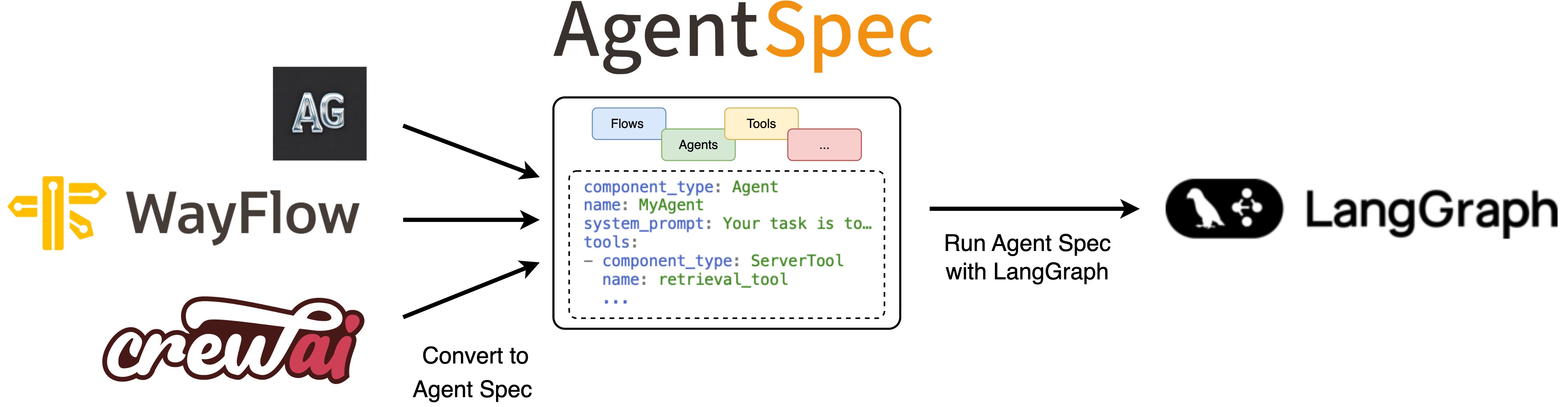
↑ With the Agent Spec adapter for LangGraph, you can easily import agents from external frameworks using Agent Spec and run them with LangGraph.#
LangGraph facilitates the creation and management of long-running, stateful agents with durable execution and human-in-the-loop capabilities.
Get started#
To get started, set up your Python environment (Python 3.10 or newer required), and then install the PyAgentSpec package with the LangGraph extension.
python -m venv .venv
source .venv/bin/activate  # On Windows: .venv\Scripts\activate
pip install "pyagentspec[langgraph]"
You are now ready to use the adapter:
Run Agent Spec configurations with LangGraph#
# Create a Agent Spec agent
from pyagentspec.agent import Agent
from pyagentspec.llms.openaicompatibleconfig import OpenAiCompatibleConfig
from pyagentspec.property import FloatProperty
from pyagentspec.tools import ServerTool

subtraction_tool = ServerTool(
    name="subtraction-tool",
    description="subtract two numbers together",
    inputs=[FloatProperty(title="a"), FloatProperty(title="b")],
    outputs=[FloatProperty(title="difference")],
)

agentspec_llm_config = OpenAiCompatibleConfig(
    name="llama-3.3-70b-instruct",
    model_id="/storage/models/Llama-3.3-70B-Instruct",
    url="url.to.my.llm",
)

agentspec_agent = Agent(
    name="agentspec_tools_test",
    description="agentspec_tools_test",
    llm_config=agentspec_llm_config,
    system_prompt="Perform subtraction with the given tool.",
    tools=[subtraction_tool],
)

# Export the Agent Spec configuration
from pyagentspec.serialization import AgentSpecSerializer

agentspec_config = AgentSpecSerializer().to_json(agentspec_agent)

# Load and run the Agent Spec configuration with LangGraph
from pyagentspec.adapters.langgraph import AgentSpecLoader

def subtract(a: float, b: float) -> float:
    return a - b

async def main():
    loader = AgentSpecLoader(tool_registry={"subtraction-tool": subtract})
    assistant = loader.load_json(agentspec_config)

    while True:
        user_input = input("USER >> ")
        if user_input == "exit":
            break
        result = await assistant.ainvoke(
            input={"messages": [{"role": "user", "content": user_input}]},
        )
        print(f"AGENT >> {result['messages'][-1].content}")


# anyio.run(main)
# USER >> Compute 987654321-123456789
# AGENT >> The result of this subtraction is 864197532.
Convert LangGraph agents to Agent Spec#
# Create a LangGraph Agent
from typing_extensions import Any, TypedDict
from langchain_openai.chat_models import ChatOpenAI
from langgraph.graph import END, START, StateGraph
from pydantic import SecretStr

class InputSchema(TypedDict):
    city: str

class OutputSchema(TypedDict):
    response: Any

class InternalState(TypedDict):
    weather_data: str

def get_weather(state: InputSchema) -> InternalState:
    """Returns the weather in a specific city.
    Args
    ----
        city: The city to check the weather for

    Returns
    -------
        weather: The weather in that city
    """
    return {"weather_data": f"The weather in {state['city']} is sunny."}

def llm_node(state: InternalState) -> OutputSchema:
    model = ChatOpenAI(
        base_url="your.url.to.llm/v1",
        model="/storage/models/Llama-3.1-70B-Instruct",
        api_key=SecretStr("t"),
    )
    result = model.invoke(
        f"Reformulate the following sentence to the user: {state['weather_data']}"
    )
    return {"response": result.content}

graph = StateGraph(InternalState, input_schema=InputSchema, output_schema=OutputSchema)
graph.add_node("get_weather", get_weather)
graph.add_node("llm_node", llm_node)
graph.add_edge(START, "get_weather")
graph.add_edge("get_weather", "llm_node")
graph.add_edge("llm_node", END)
assistant_name = "Weather Flow"
langgraph_agent = graph.compile(name=assistant_name)

# Convert to Agent Spec
from pyagentspec.adapters.langgraph import AgentSpecExporter

agentspec_config = AgentSpecExporter().to_json(langgraph_agent)