🔒 Deep Data Security
Details
Oracle Deep Data Security enforces fine-grained, identity-aware authorization directly in the database. You define declarative policies, data grants, that control access at the row and column level for data roles and end users. When the AI Optimizer’s Natural Language to SQL agent connects as an end user, its data grants determine the fine-grained access available to that identity.
The Deep Data Security tool lets you create and manage these objects from the AI Optimizer. It operates on the database currently selected in the client configuration.

Requires Oracle AI Database 26ai
Deep Data Security is available in Oracle AI Database 26ai. When the connected database does not support it, the Deep Data Security tab detects this and is automatically disabled.
Prerequisites
The configured database user needs the Deep Data Security privileges described in the Database Configuration documentation. The tool reads the user’s privileges and enables only the actions that are permitted; anything the user is not privileged to do is disabled.
Using Deep Data Security
Open the Tools menu and select the Deep Data Security tab. It is organized into three sections:
Typical workflow
To apply governed access to Vector Search or NL2SQL, follow this sequence:
Create a local data role.

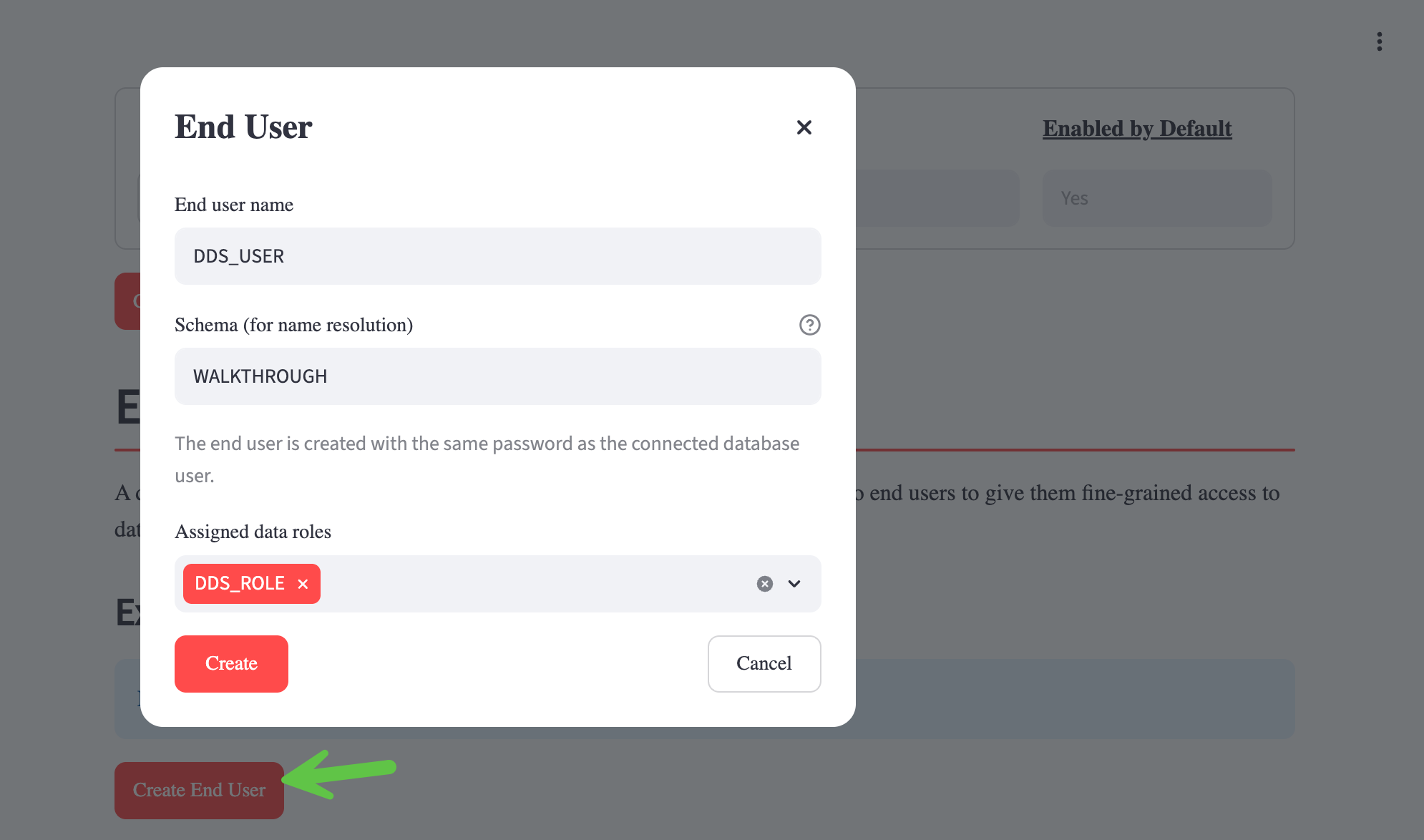
Create an end user and assign the data role to it.
If more than one end user exists, select the end user in Connect tools as.

Create a data grant for that role, specifying the tables or views, privileges, and any column or row restrictions.

Use Vector Search or NL2SQL and enable Deep Data Security to confirm that the tools return only the data allowed by the grant.

Data Roles
Create and drop data roles, the principals that data grants authorize. A data role can be local, or mapped to an external application role (for example, an identity-provider group). You can assign local data roles to end users in the tool. Externally mapped roles are enabled through IAM and cannot be assigned to end users in the tool.
End Users
Create and drop Deep Data Security end users, the identities whose access is governed by data grants. The schema selected for an end user controls how unqualified object names are resolved and defaults to the connected database user’s schema.
Use Connect tools as to select the end user that Vector Search and NL2SQL will use for the active database. When exactly one end user exists, the application selects it automatically when you first use a database chat tool. Enable Deep Data Security in the Chatbot sidebar to use that connection. This lets you preview how those tools behave for a governed identity while keeping the AI Optimizer configuration connected as the database user that manages the objects. This selection applies only to the active database and can be cleared.
Data Grants
Build a data grant that authorizes a data role against one of your tables or views:
- Choose the object (table or view) and one or more privileges (
SELECT,INSERT,UPDATE,DELETE). - Restrict access to specific columns, or to all columns except a chosen set, for column-level control.
- Add an optional row predicate (a SQL
WHEREexpression) for row-level control. - Select the data role to grant to.
The generated CREATE DATA GRANT statement is shown for review before you apply it. Existing data grants are listed and can be dropped. You can edit a grant when its column restrictions are the same for every applicable privilege. For grants with different column restrictions per privilege, drop and recreate the grant, or manage it directly with SQL.
How it works
In the AI Optimizer, the configured database user, for example DEMO, owns the application objects, vector stores, and any tables it creates. When Deep Data Security is not enabled, the Vector Search and NL2SQL tools connect as DEMO with full access to the data in the schema.
Creating a Deep Data Security data role and end user using the configured DEMO user will not transfer DEMO’s object privileges to that end user.
In the standard AI Optimizer setup, the end user receives only the permission required to connect to the database. In practice, this means that when Deep Data Security is enabled, the Vector Search and NL2SQL will have no access to the data in DEMO’s schema.
In order for the Deep Data Security end user to access DEMO’s data, data grants must be created.
For example, suppose DEMO owns a DRIVERS table with DRIVER_ID, NAME, and TEAM_ID. Without any data grants and Deep Data Security enabled, a NL2SQL prompt to list DRIVERS cannot retrieve data from the table.
After a data grant, such as:
For that end user, SELECT DRIVER_ID, NAME, TEAM_ID FROM DRIVERS returns TEAM_ID for every row, with NULL for DRIVER_ID and NAME. It cannot insert, update, or delete rows unless you create additional data grants for those operations.
Choose All columns to grant the role read access to DRIVER_ID, NAME, and TEAM_ID. Choose All columns except NAME to make DRIVER_ID and TEAM_ID available while NAME returns NULL. A row predicate can further limit access; for example, WHERE TEAM_ID = 10 permits access only to drivers on team 10.
Data grants are additive, so additional grants can authorize more columns, rows, or operations.