🤖 Model Configuration
Details
Supported Models
At a minimum, a Language Model must be configured in the AI Optimizer for basic functionality. For Retrieval-Augmented Generation (RAG), an Embedding Model will also need to be configured.
There is an extensive list of different model providers available to choose from.
Too Small to Handle
Some older and small Language Models may not have native function/tool calling support for NL2SQL and RAG, which may result in unexpected results.
Configuration
The models can either be configured using environment variables or through the AI Optimizer interface. To configure models through environment variables, please read the Additional Information about the specific model provider you would like to configure.
To configure a Language Models or Embedding Models, from the AI Optimizer, navigate to Configuration page and Models tab:
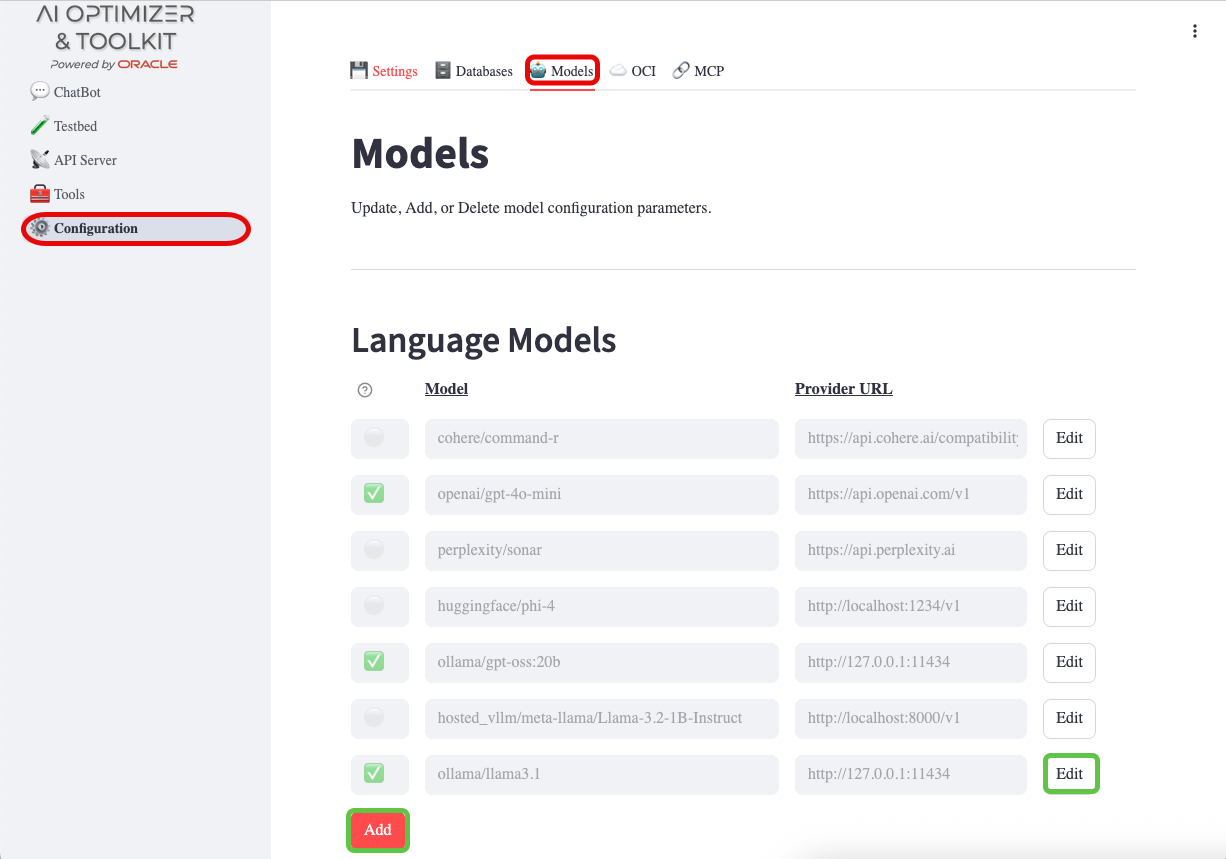
Add/Edit/Delete
Set the Provider, API Key, and Provider URL as required. For Language Models you can also set the Max Input Tokens (Context Length) and Max Output (Completion) Tokens; for Embedding Models, set the Max Chunk Size. These values can often be found on the model card—if they are not listed, the defaults are usually sufficient.
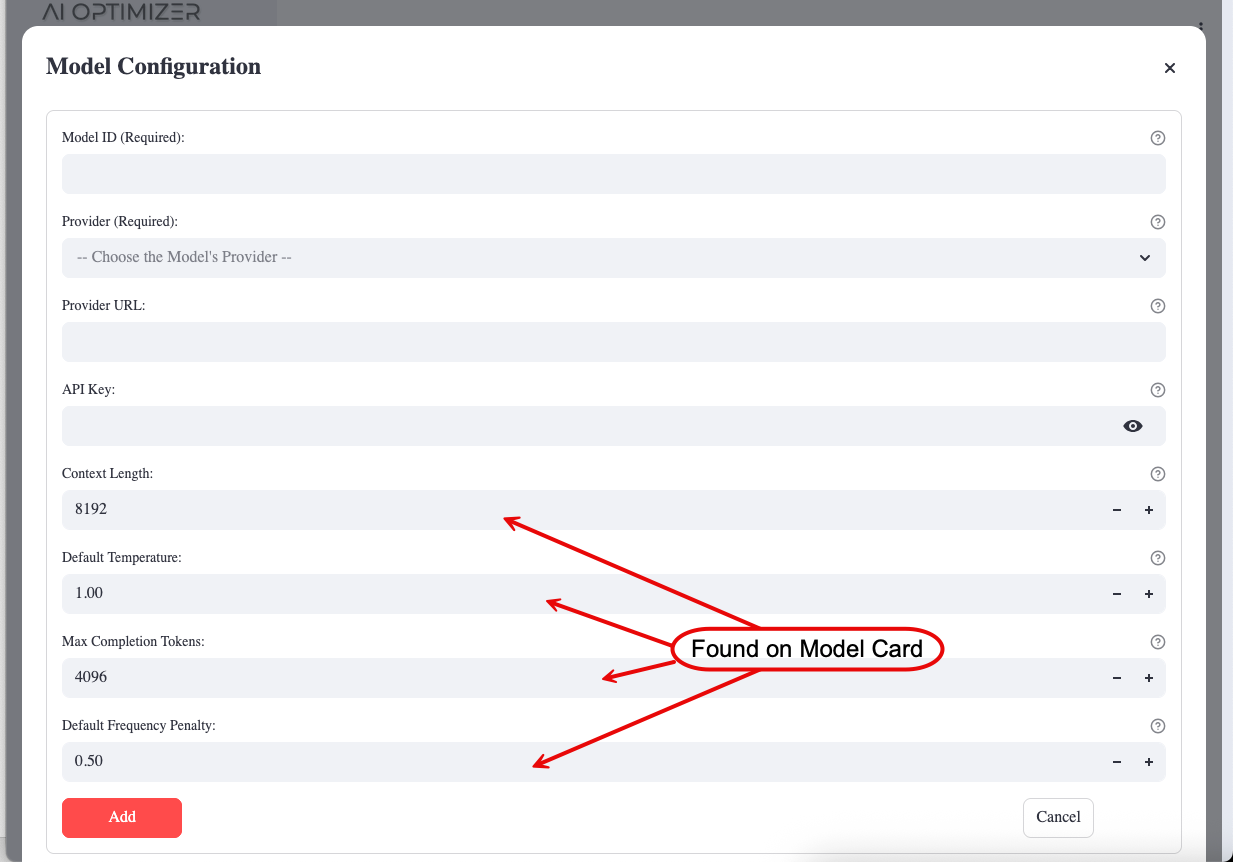
Most models ship pre-configured but disabled. When editing a model, tick the Enabled checkbox to activate it.
More than meets the eye
Enabling a model is necessary but not always sufficient for it to appear in selection lists. The AI Optimizer only offers models that are both enabled and reachable (a valid Provider URL, and an API Key where one is required).
To remove a model, use the Delete button while editing it; any settings that referenced it are cleared automatically.
Provider
The AI Optimizer supports a number of model providers. When adding a model, choose the most appropriate provider. If unsure, or the specific provider is not listed, try a LiteLLM OpenAI-compatible provider, such as openai_like or custom_openai, before opening an issue requesting additional model provider support.
There are a number of local AI Model runners that use OpenAI-compatible APIs, including:
When using these local runners, select the appropriate LiteLLM provider. For example, use hosted_vllm for vLLM, or an OpenAI-compatible provider such as openai_like or custom_openai for other compatible endpoints.
Provider URL
The Provider URL for the model will either be the URL, including the IP or Hostname and Port, of a locally running model; or the remote URL for a Third-Party or Cloud model.
Examples:
- Third-Party: OpenAI - https://api.openai.com
- On-Premises: Ollama - http://localhost:11434
- On-Premises: LM Studio - http://localhost:1234/v1
API Keys
Third-Party cloud models, such as OpenAI and Perplexity AI, require API Keys. These keys are tied to registered, funded accounts on these platforms. For more information on creating an account, funding it, and generating API Keys for third-party cloud models, please visit their respective sites.
On-Premises models, such as those from Ollama or HuggingFace usually do not require API Keys. These values can be left blank.
CPU Optimization
When running models on CPU-only systems (without GPU acceleration), smaller models provide significantly better performance and responsiveness. The AI Optimizer includes built-in optimizations for CPU-friendly models.
Recommended CPU-Friendly Models
Small local models are often a better fit for CPU-only systems. When an Ollama server is configured with AIO_ON_PREM_OLLAMA_URL, the AI Optimizer discovers pulled Ollama models and enables them automatically.
Examples of CPU-friendly model choices include:
| Model | Parameters | Max Tokens | Use Case |
|---|---|---|---|
llama3.2:1b | 1B | 2048 | Fast responses, simple Q&A |
granite4.1:8b | 8B | 2048 | Balanced performance/quality |
gemma3:1b | 1B | 2048 | Lightweight, efficient |
Vector Search Optimization
When a selected model name includes a parameter count below 7B, such as llama3.2:1b or gemma3:1b, the AI Optimizer automatically disables these Vector Search
features:
- Store Discovery: Uses the Language Model to select the most appropriate Vector Store. When disabled, you must select the Vector Store manually if more than one is available.
- Document Grading: Evaluates retrieved documents for relevance before they are used.
- Prompt Rephrase: Rephrases queries using the conversation context to improve retrieval.
Disabling these features reduces the number of Language Model calls and can significantly improve response times. You can manually enable or disable each feature using the checkboxes in the Vector Search sidebar, regardless of model size.
Performance Tips
- Model Selection: Choose the smallest model that meets your quality requirements
- Reduce Top K: Lower the number of retrieved documents (e.g., Top K = 3-5)
- Lower Max Tokens: Reduce maximum output tokens to speed up generation
- Temperature 0: Use temperature 0 for deterministic, faster responses
Additional Information
OCI GenAI
OCI GenAI is a fully managed service in Oracle Cloud Infrastructure (OCI) for seamlessly integrating versatile language models into a wide range of use cases, including writing assistance, summarization, analysis, and chat.
Please follow the Getting Started guide for deploying the service in your OCI tenancy.
OCI GenAI models are not added one at a time. Instead, the AI Optimizer loads the chat and embedding models available in your configured Region—either interactively from the OCI tab, or automatically at startup when a usable profile already has a GenAI Compartment OCID and Region persisted. See Loading OCI GenAI Models for details.
Skip the GUI!
The GenAI Compartment OCID and Region can be supplied via environment variables. See OCI GenAI configuration.
Alternatively, you can specify the following in the ~/.oci/config configfile under the appropriate OCI profile:
Ollama
Ollama is an open-source project that simplifies the running of Language Models and Embedding Models On-Premises.
When configuring an Ollama model in the AI Optimizer, set the Provider URL (e.g http://127.0.0.1:11434) and leave the API Key blank. Substitute the IP Address with the IP of where Ollama is running.
Skip the GUI!
Ollama models can be enabled via environment variables. See Model Overrides configuration.
Pulling Models
You don’t have to drop to the command line to make an Ollama model available. A Pull button appears next to any Ollama model on the Models tab that hasn’t been pulled to the Ollama server yet.

Click the “Pull” button and the AI Optimizer downloads the model from the Ollama registry.
Quick-start
Example of running granite4.1:8b on a Linux host:
- Install Ollama:
- Pull the granite4.1:8b model:
- Start Ollama
For more information and instructions on running Ollama on other platforms, please visit the Ollama GitHub Repository.
HuggingFace
HuggingFace is a platform where the machine learning community collaborates on models, datasets, and applications. In the AI Optimizer, the built-in HuggingFace embedding configuration is intended for a Hugging Face Text Embeddings Inference (TEI) endpoint.
Skip the GUI!
The built-in HuggingFace TEI configuration can be enabled via environment variables. See Model Overrides configuration.
Quick-start
Example of running thenlper/gte-base in a container:
Set the Model based on CPU or GPU
- For CPUs:
export HF_IMAGE=ghcr.io/huggingface/text-embeddings-inference:cpu-1.2 - For GPUs:
export HF_IMAGE=ghcr.io/huggingface/text-embeddings-inference:0.6
- For CPUs:
Define a Temporary Volume
Define the Model
Start the Container
Determine the IP
NOTE: If there is no IP, use 127.0.0.1
Cohere
Cohere is an AI-powered answer engine. To use Cohere, you will need to sign-up and provide the AI Optimizer an API Key. Cohere offers a free-trial, rate-limited API Key.
WARNING: Cohere is a cloud model and you should familiarize yourself with their Privacy Policies if using it to experiment with private, sensitive data in the AI Optimizer.
Skip the GUI!
Cohere models can be enabled via environment variables. See Model Overrides configuration.
OpenAI
OpenAI is an AI research organization behind the popular, online ChatGPT chatbot. To use OpenAI models, you will need to sign-up, purchase credits, and provide the AI Optimizer an API Key.
WARNING: OpenAI is a cloud model and you should familiarize yourself with their Privacy Policies if using it to experiment with private, sensitive data in the AI Optimizer.
Skip the GUI!
OpenAI models can be enabled via environment variables. See Model Overrides configuration.
OpenAI-Compatible
Many “AI Runners” provide OpenAI-compatible APIs. These can be configured with LiteLLM OpenAI-compatible providers such as openai_like or custom_openai. The Provider URL will normally be a local address and the API Key can often be left blank.
Perplexity AI
Perplexity AI is an AI-powered answer engine. To use Perplexity AI models, you will need to sign-up, purchase credits, and provide the AI Optimizer an API Key.
WARNING: Perplexity AI is a cloud model and you should familiarize yourself with their Privacy Policies if using it to experiment with private, sensitive data in the AI Optimizer.
Skip the GUI!
Perplexity models can be enabled via environment variables. See Model Overrides configuration.